

Hello readers! I’d like to grumble about KDP (Kindle Direct Publishing). In many ways, it is a fantastic service for indie authors, allowing us to sell our books on Amazon in electronic form, paperback, hardback, and even audio formats. We have complete control over the book description, the formatting, and the cover – and we retain the full rights to the book itself. Amazon is such a big marketplace that pretty much anyone in the world can read your work through KDP – so really, what is there to complain about?
Well. Where do I start…
Publishing a paperback on Amazon is, on paper (ha ha), very simple. Amazon accepts PDF files, sends them to print, and voila – a paperback is soon shoved through your letterbox. They’ll print pretty much anything, and have only the most basic quality checks (which I think boil down to whether the file can be read by their printers). This means that your uploaded PDF file must be fully formatted – margins correctly sized, fonts consistent, pages numbered, headers correct, etc., etc. This process takes much more time and effort than simply uploading a Word document to Kindle Create, their e-book service (which has its own issues). Still, formatting comprises only a tiny fraction of the time spent writing the book in the first place.
To help out struggling indie authors, Amazon provides a Word template that perfectly fits their standard paperback size. This template is essentially just a document with pre-set margin sizes, so authors have to do the rest of the text formatting themselves. Still, it does lessen the chance of the first proof copy having words running off the page, and for that I suppose we should be grateful…
Once uploaded, KDP offers a Cover Creator, which calculates the width of your book spine based on the number of pages in your PDF, and the paper type you have selected (white, cream, and eco all have different thicknesses). This means you can arrange your cover designs without worrying about complicated calculations and misalignments from the printing process.
As for the interior formatting, it’s nothing that Microsoft Word can’t handle. The Styles tab works miracles, and saves me from having to buy the expensive software that professional publishers use, or doing the whole thing in LaTeX (as my partner once recommended – not even as a joke). At the end of the process, I have a serviceable PDF that looks close enough to a published novel.
And this is where my problems begin.
For the last week, I have been trying repeatedly and unsuccessfully to upload my PDF manuscript to the KDP website. I’ve uploaded various versions with different file sizes, layers, and text quality, but they all get stuck in the system. KDP presents a big green box with a tick-mark, telling me my files have been successfully uploaded, before a message appears, reading “Processing your file…” which NEVER goes away.
Have any other indie authors out there every had this issue? I’d love to hear how you solved it.
Because the file refuses to process, I can’t format the cover for my book. Even if I took the easiest route of all, using a pre-set Amazon cover, this wouldn’t work, because the spine width can’t be calculated until the file is processed. So, it is physically impossible for me to send my book to print until this problem is resolved.
Why is this happening?
A quick look online reveals that plenty of other people have had this problem, going all the way back to when the paperback service first started. I found Reddit threads, KDP community posts, and Stack Exchange threads all reporting the same thing. And although many people offered solutions, none of them ever solved the problem. I guess it either went away on its own, or the authors just gave up.
Given that my book is just text, it can’t be causing any of the common formatting problems associated with images or layers or comments. The only other potential problem is the type of PDF – and this sent me down a rabbit-hole of researching file types for a few hours. Apparently, KDP’s preferred flavour of PDF is PDF/X-1a, an ancient PDF format that embeds fonts, making publishing faster. The thing is, KDP shouldn’t need this file type. It doesn’t ask for it up front. Indeed, it claims to be quite flexible, and supposedly accepts all manner of formats (including e-book files). It should, in theory, accept any type of PDF.
Did you readers even know that there were different types of PDF? I sure as hell didn’t. I assumed that the file extension “.pdf” indicated ONE type of file – not several. How does any of this actually work? (If you want to tell me, please keep explanations to under 150 words, thank you.)
Unfortunately, PDF/X-1a is so antiquated that neither Microsoft Word nor Libre Office can export in that format. I dived into various hidden menus, changing how fonts were embedded, changing the quality and resolution, removing layers… And none of it worked. My file still gets stuck on the KDP website.
Oh, an AI assistant. Just what I need.
When I tried to search for help, Amazon gave me an AI help bot. Which, as we all could have predicted, wasn’t much help at all. It was actually the bot that told me to save my file as a PDF-X/1a, contradicting much of the information on the official help pages. And I don’t know how Amazon trains its AI “KDP Assistant”, so I suppose there’s a chance that it was pulling solutions out of its artificially intelligent ass.
I then asked the bot if I could speak to a real person, and it immediately gave me the cold shoulder:
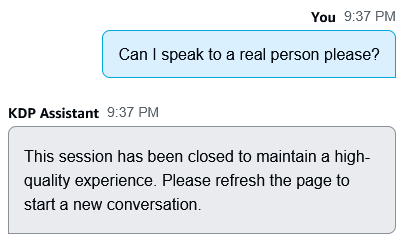
Also, yes, it was 9:37 PM. I had been trying and failing to upload my PDF for three hours, and was losing patience at the same rate that I was gaining tiredness. How could uploading a document take so long?!
Gopala to the rescue
Thankfully, after I forcefully resuscitated the AI Assistant and demanded yet again to speak to an actual human person, it patched me through to reality – specifically, to an agent named Gopala. After 10 minutes of me trying to confirm the official name of my KDP account (third time lucky), Gopala goes to check the upload status of my manuscript, and reports that it all looks fine. Huh? They recommend that I try uploading again, so I do. And again, it all looks fine on Amazon’s end. Gopala says they don’t know why it isn’t working for me. I try uploading again (definition of madness, right?) and we get the same result. Gopala checks out with “okay” and “I will check with our concerned team on why this happening and will get back to you with an update on 1-2 business days”. This happened on Thursday, so I’ve been left twiddling my thumbs all weekend, awaiting their response.
And there we have it. Paperback is delayed.
Today’s post should have been announcing the release of my new book. Instead, I’m waiting for a reply from KDP, explaining why their system isn’t working, and what I can do to get this book in physical form.
Wish me luck I guess.
Riddle me this though…
Amazon is one of the wealthiest companies in the world. They have thousands of employees working around the clock, including in web services. How is it that KDP remains such a glitchy, barely-functioning mess?
We all know the answer. Amazon is simply too big to care. They have a monopoly over the book market, and they really don’t mind if the odd hobby author falls through the cracks when their system breaks down. Writers are so keen to get their work out to their readers that they will put up with an unsatisfactory service, meaning that Amazon has no impetus to improve things. If they thought they faced any real competition from Royal Road or IngramSpark, maybe they would up their game – but they don’t. This is yet another example of why monopolies never improve human experiences.
Hey, did any of you readers predict that this rant about KDP was going to end up as a rant about capitalism?! Ugh. I digress…
What do we need? MORE sub-par services?
You have probably seen the tide of AI slop that is engulfing the indie publishing market, particularly on Amazon. It’s getting harder for readers to find genuine books, and this makes it harder for genuine authors to make a living. Sadly, despite all my complaining regarding the inefficacy of KDP, it is far too easy for scammers to churn out AI “stories” and publish them as e-books and paperbacks on Amazon. But is Amazon doing anything to stop this? Not so far as I can tell.
Maybe one of the biggest companies in the world could find some way to limit the spread of AI slop on its platform? Maybe they could put a cap on the number of books that a single author can publish in a month? Maybe they could block obvious AI slop farms?
But no. The only thing I’ve heard from Amazon recently regarding AI is that they are now encouraging indie authors to create AI audiobooks. Doesn’t that sound wonderful?! Feed your book into Amazon’s AI narrator – it will definitely sound just as you imagined!
Give. Me. Strength.
In summary…
Sorry for the rather negative tone this week. I’m so tired of Amazon’s antics that I’m in half a mind to take my books elsewhere… But the monopoly is real. And when KDP works, in its clunky, awkward fashion, it does produce results.
I’ll keep you updated on the progress of the paperback. Hopefully I’ll be able to get it out before the end of the month… In the meantime, happy reading, and have a lovely week!

AN UPDATE: Gopala to the rescue again!
I received an email on Saturday night (a business day, apparently?) telling me that the technical team found transparencies in my submitted PDFs, which was why they kept getting stuck in the system. I was once again instructed to use PDF/X-1a, so this time I dug deeper to find out exactly how I could do this, given that Microsoft print to PDF function does not allow it.
In the end, I went into my “Printer and Devices” settings on my PC, created a new custom paper size for printing that matched Amazon’s specifications, then temporarily upgraded to Adobe Acrobat Pro in order to access the “Adobe print to PDF feature” through Microsoft Word, where I could change the advanced settings to select my new custom paper size, AND ALSO tell it to print as PDF/X-1a. Ugh.
Still, good news: we now have a paperback on the way. Finally!
BUT WHY WAS THIS SO HARD TO DO?! Why can’t Microsoft’s print to PDF use custom page sizes? I really HATE being forced to turn to Adobe (I’ll save my rant about that company for another time). It’s genuinely baffling how many technological hoops I had to jump through to achieve something so simple. And if this happened to me, I can only assume that it happens to hundreds of other indie authors as well. You’d think the KDP agents would be sick of dealing with this same problem again and again…
Also, it would have been nice for KDP to send me an automated error message, rather than leaving me confused for a week. Why did Gopala have to go digging through the system in order to find what was wrong? Couldn’t the upload process just tell me that the file type was incompatible?! It would have saved us both a lot of hassle. Still, big thanks to Gopala coming to the rescue. Maybe the next book should be dedicated to them!
Links:
My Amazon Author page:
https://www.amazon.co.uk/stores/C.-W.-Clayton/author/B09YZXSQ3D
Discover more from C. W. Clayton
Subscribe to get the latest posts sent to your email.


